


The latest AiDot App Update 2.2.1 is here, bringing exciting features that transform your smart home management. This update adds enhanced widgets and new smart remote controls to make your experience even more personalized and intuitive. Whether you want easy access to device status, quick scene switching, or enhanced control over your bathroom’s ambiance, AiDot App’s new update covers it all. Let’s explore these features in detail to see how they can elevate your smart home setup.
Key New Features in AiDot App Update 2.2.1
1. AiDot Widgets for iOS 18
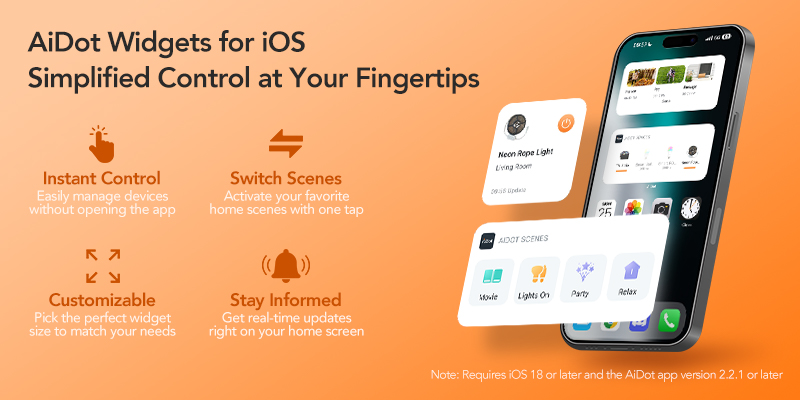
One of the main highlights in this update is the introduction of customizable home screen widgets for iOS 18, designed to simplify your smart home interactions.
Instant Control: Easily manage devices without opening the app.
Customizable: Pick the perfect widget size to match your needs.
Switch Scenes: Activate your favorite home scenes with one tap.
Stay Informed: Get real-time updates right on your home screen.
2. Enhanced Bathroom Fan Light Features
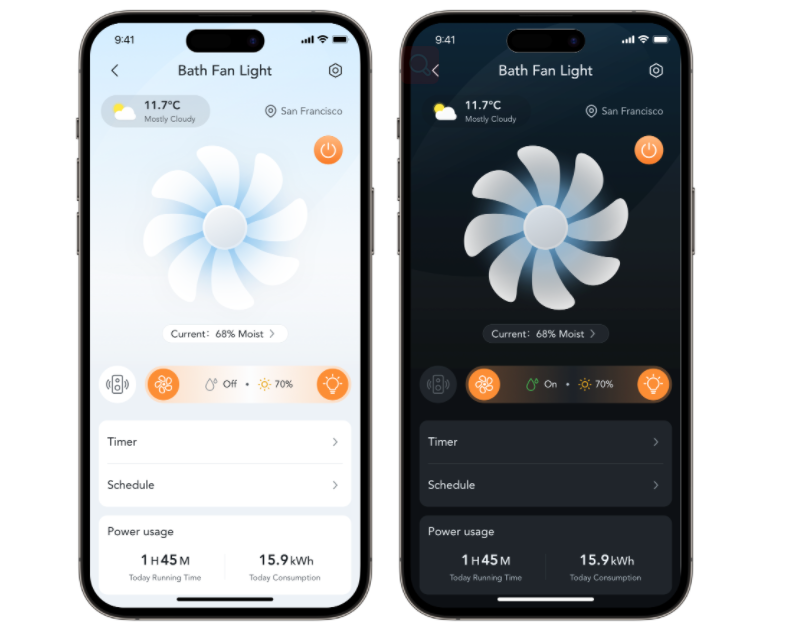
The AiDot App 2.2.1 update brings new options to the bathroom fan light, making it more than just a fan-it’s a relaxing escape.
Music Mode for a Spa-like Experience: Now, you can sync your bathroom fan with your favorite playlist, turning every shower into a personalized spa session. Imagine relaxing with soft tunes, all harmonized with your lighting.
Auto Dehumidification: The new smart humidity control automatically dehumidifies your bathroom, keeping it fresh and free from unwanted dampness. This feature improves air quality and extends the lifespan of your bathroom surfaces by reducing moisture buildup.
3. Smart Remote Control Capabilities
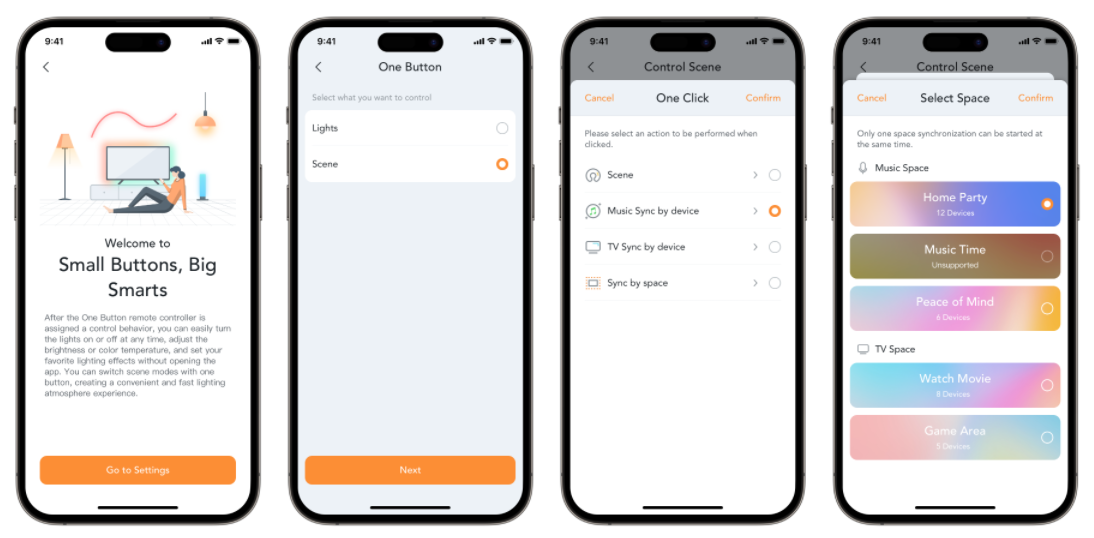
This update includes enhanced smart remote control capabilities, allowing you to control essential features from a single device.
Music Mode Control: Start or stop your music with a single button on your remote, ideal for those who want hassle-free control over their audio experience.
TV Sync Control: Another key feature is the ability to sync and control your TV settings through one remote. You can now switch seamlessly between TV and music modes with one click, perfect for setting the right mood without needing multiple remotes.
How to Add Widgets to Your Smart Home
How to Add Widgets to Your Home Screen
Step 1: Touch and hold an app, widget, or empty space on your Home Screen until your apps and widgets jiggle.
Step 2: Tap Edit or + in the upper-left corner, then tap Add Widget.
Step 3: Select AiDot, choose the widget you want to add, then tap Add Widget.
Step 4: Touch and drag the indicator on the bottom-right corner of the widget to resize it.
Step 5: Tap Done in the upper-right corner to complete the process.
How to Add Widgets to Your Today View
Step 1: Open your Today View by swiping right from your main Home Screen.
Step 2: Touch and hold an empty area until your widgets jiggle.
Step 3: Tap Edit or + in the upper-left corner, then tap Add Widget.
Step 4: Select AiDot, choose the widget you want to add, then tap Add Widget.
Step 5: Touch and drag the indicator on the bottom-right corner of the widget to resize it.
Step 6: Tap Done in the upper-right corner to complete the process.
How to Add Widgets to Your Lock Screen
Step 1: Touch and hold an empty area of your Lock Screen until the Customize button appears, then tap it.
Step 2: Tap to select Lock Screen, then tap within the widget area to open the widget menu.
Step 3: Select AiDot, choose the widget you want to add and tap to add it.
Step 4: You can touch and hold any of your widgets then drag to reposition them.
Benefits of Using the AiDot App for Smart Home Control
AiDot continues to make smart home integration effortless, with new functionalities that expand its compatibility and ease of use.
Linkind and AiDot: A Perfect Pair for Smart Home Integration
Linkind’s products with the "Works with AiDot" badge can integrate seamlessly with the AiDot app, giving users control through a range of popular ecosystems, including Matter, Alexa, Apple Home, Google Home, SmartThings, and IFTTT.
Why Choose AiDot for Your Smart Home?
Simplified Control of Multiple Smart Devices: With the AiDot App, managing multiple smart devices has never been easier. By connecting all your devices in one place, you can simplify daily tasks and bring more order to your routine.
Convenient Integration with Popular Ecosystems: Compatibility with major ecosystems like Alexa and Google Home, you’re free to control your devices through your preferred platform, integrating voice commands into your daily life for hands-free convenience.
Enhanced Home Atmosphere and Customization: AiDot allows users to personalize everything from lighting to music and ambiance. Tailor your home to match your mood or schedule, making each day unique and enjoyable.
Improved Home Protection and Monitoring: The new IPC widget keeps you updated on home security with real-time monitoring. Whether you’re away or at home, you’ll have peace of mind knowing that AiDot is keeping an eye on your surroundings.
All-in-One Solution for a Seamless Smart Home Experience: The AiDot App brings everything together under one interface, creating a smooth experience across your entire smart home. With AiDot, convenience and control are always at your fingertips.
Final Touches
With the AiDot App Update 2.2.1, smart home control has reached a new level of sophistication. The addition of widgets, enhanced bathroom fan light features, and expanded smart remote compatibility make managing your smart home smoother and more intuitive.
If you’re looking to enhance your home’s functionality, the latest AiDot features offer something for everyone. Explore these updates and discover how AiDot can bring more ease, control, and comfort to your home.


0 comments